OFFLINE-FIRST POINT OF SALE
Big days.
Simple selling.
One counter. Everything connected. BechaKena brings checkout, inventory, customer dues and restaurant orders together — in Bangla and English, with no internet needed for daily sales.
Choose a module · Create a local owner and PIN. Demo data stays in this browser.
TAKE IT FOR A SPIN
Your first sale, in three steps.
No online sign-up or payment card needed. Create a local owner on first use. Start online to load the browser demo. Records stay in this browser; clearing site data removes them. Use the native app for compatible printer hardware.
- Choose Retail or Restaurant
- Take or skip the tour, then create your owner name and PIN
- Load sample items and complete a sale
A CLOSER LOOK
A whole working day.
In one place.
From the first scan to the final count, follow the details that make a shop run.
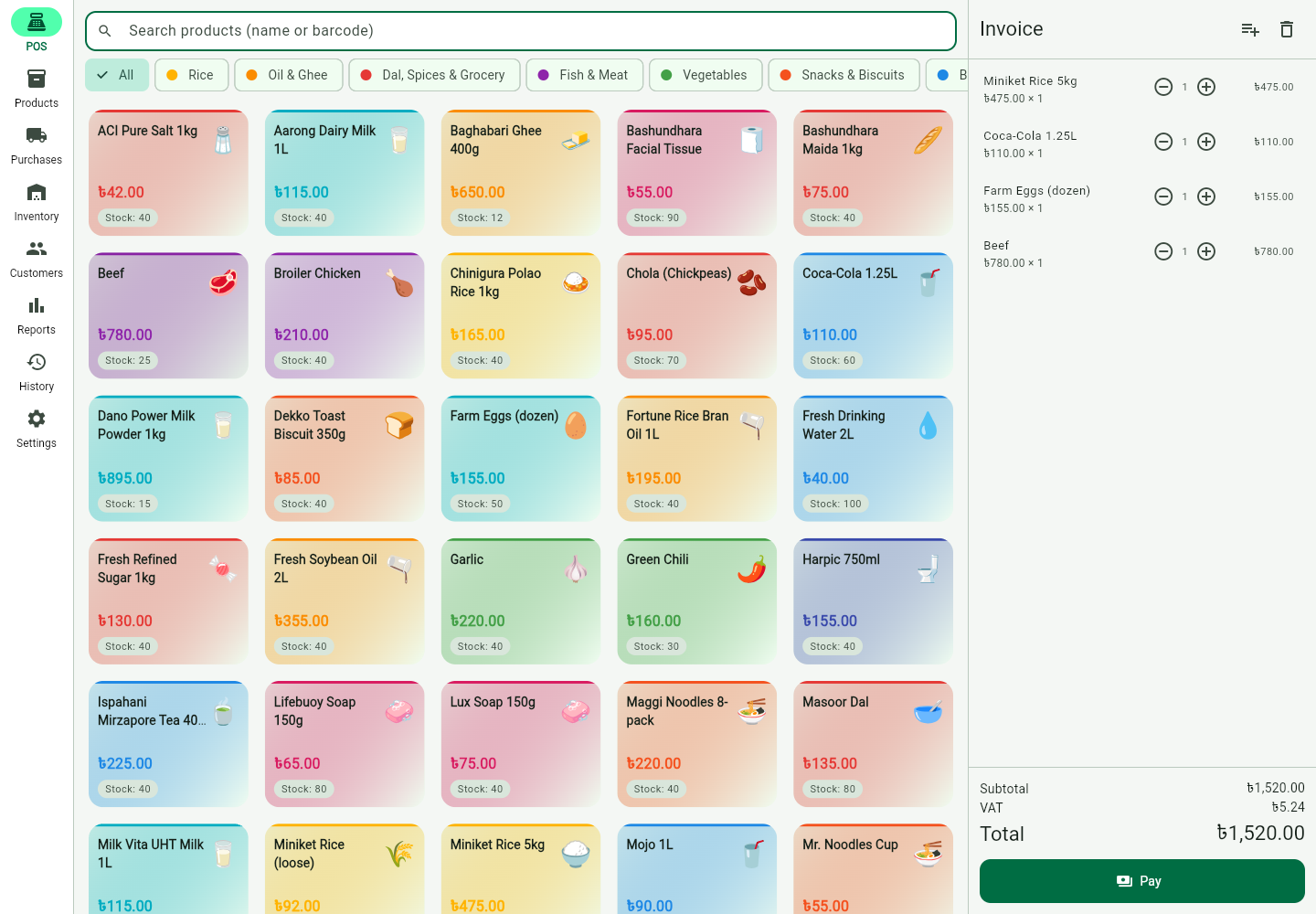
At the counter
Find a product, scan a barcode, build a bill. Split a sale across recorded payment methods and keep the queue moving.
Payment methods are recorded in the POS. This demo does not process payments.
Explore the demoOn the dining floor
Open a table, build a running order and send a kitchen ticket. Settle the bill through the same sales engine.
Table service, takeaway and delivery orders have their own workflow.
Explore the demo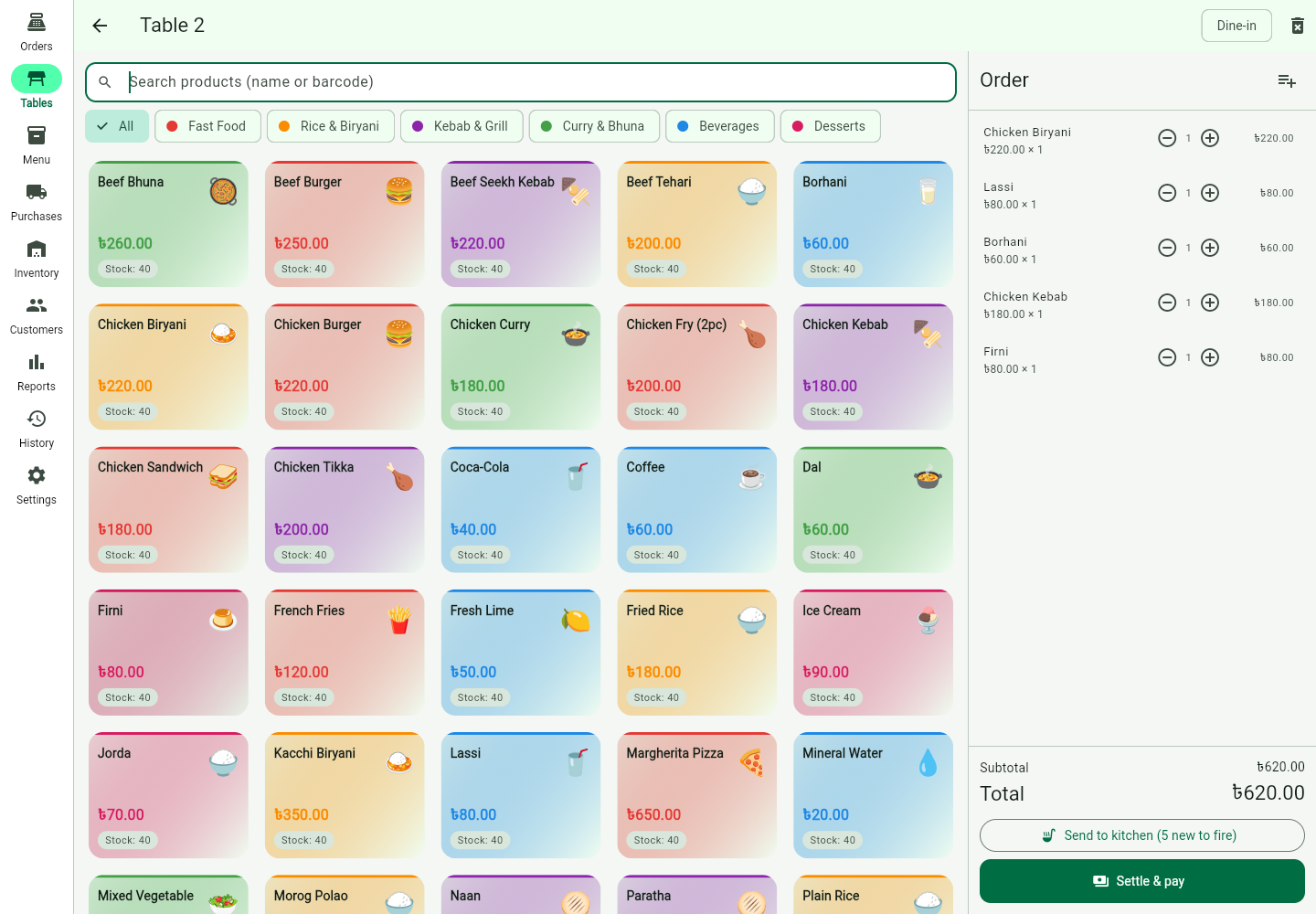
Behind the numbers
See sales, dues and stock without stitching together notebooks. Review the day, then decide what comes next.
Reports use the records held in this module’s local database.
Explore the demo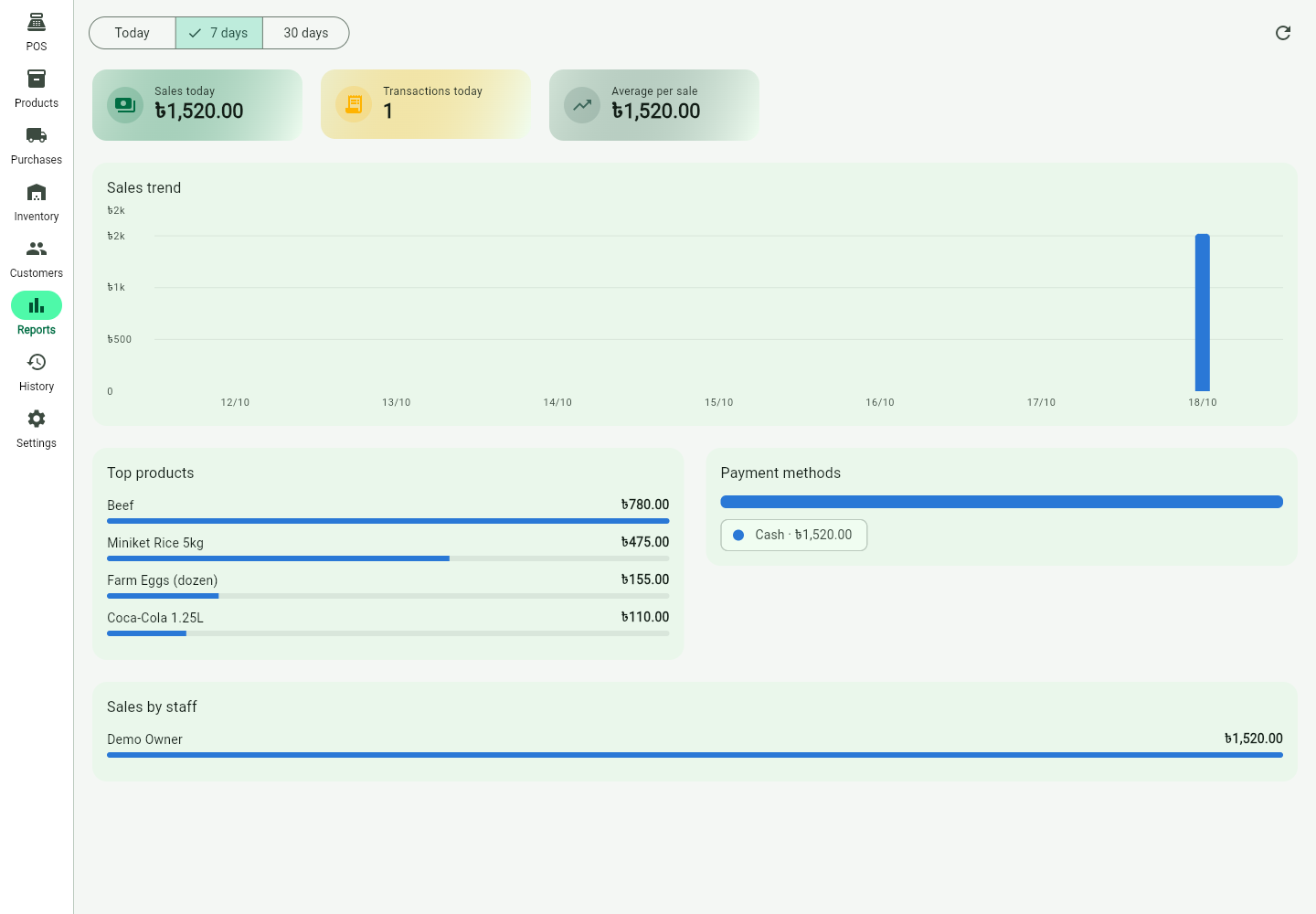
The finishing touch
Put your shop name on the bill. Preview a clear receipt and configure a thermal printer in the native app.
Hardware printing needs the native app and compatible equipment. The browser demo shows a receipt preview.
Explore the demo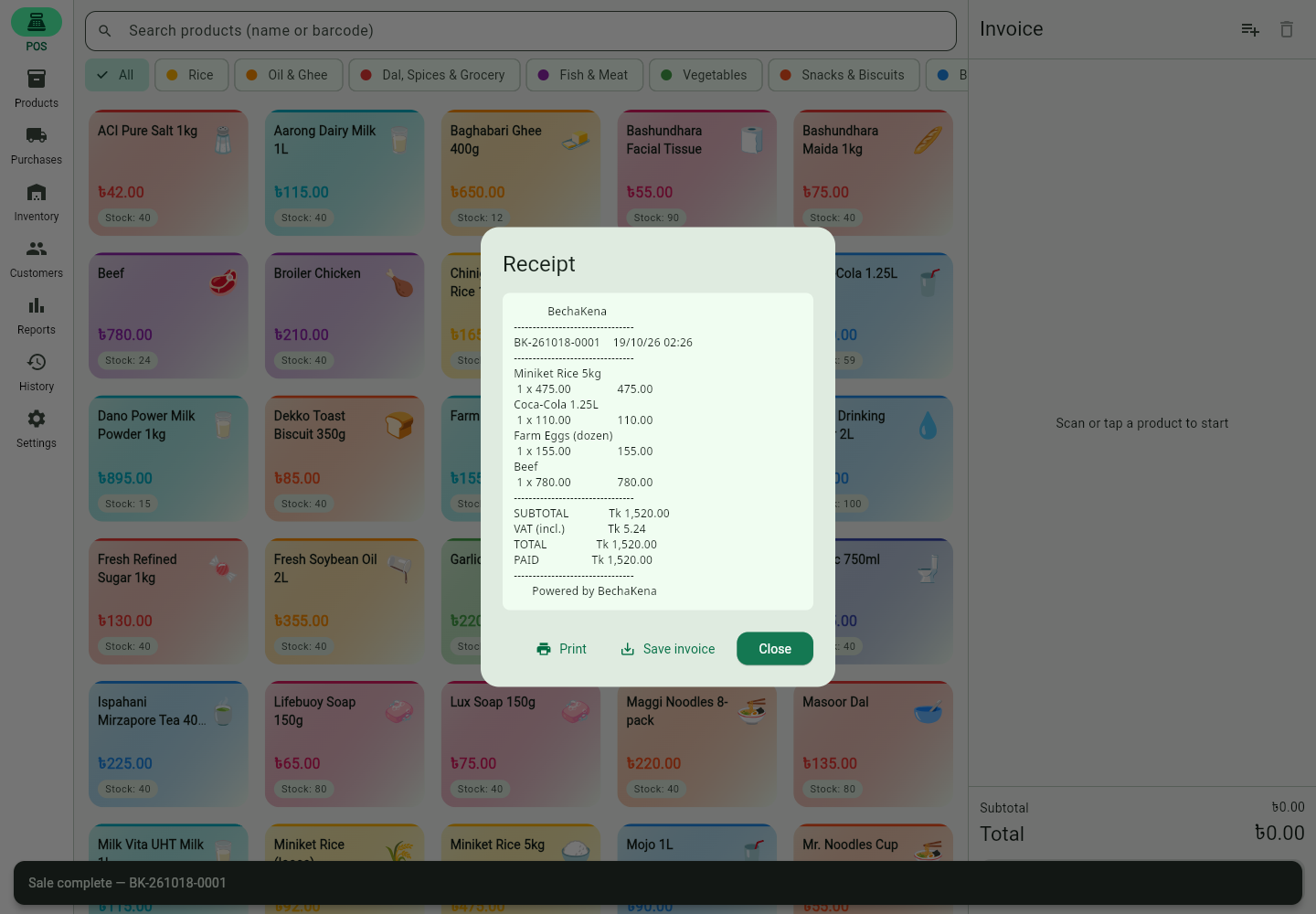
Actual product captures. Sample shop records, not customer results.
THE DETAILS MATTER
Less second-guessing.
More shopkeeping.
Remember the person. Track the due.
Customer balances, payment entries and statements keep the familiar baki khata inside your working day.
Every movement leaves a trail.
Purchases add stock. Sales take it out. Adjustments and returns keep the history, so stock comes from what actually moved.
Every paisa has its place.
Amounts are stored as whole paisa rather than floating-point estimates. Small values deserve the same care as large ones.
INDEPENDENCE, BUILT IN
No signal.
Still selling.
Your device’s local database is the source of truth. Checkout, stock and customer records work without an internet connection. Cloud services are an optional future layer.
- Build the bill
- Save on this device
- Keep the record
The browser demo stores data locally in your browser. Clearing site data removes that demo data. Native deployment has a separate local database.
SAME CARE. DIFFERENT COUNTERS.
Made for the way
you do business.
Choose a module when you open the app. Each one keeps its own catalog, staff and database.
SUPERSHOP / RETAIL
The neighborhood shop.
Fast checkout, inventory, purchases and baki khata — together at the counter.
Explore in the demoRESTAURANT
The table worth coming back to.
Dining tables, running orders and kitchen tickets — from the first order to the final bill.
Explore in the demoBUILT TO RUN ON YOUR TERMS
Local at heart. Ready for your counter.
The POS is built with Flutter and Dart, Riverpod for state, and Drift over SQLite for local storage. This showcase uses Next.js and React. Windows, Android and iOS are native targets; the web demo lets you try the workflow first.
- 01Flutter / Dart
- 02Riverpod
- 03Drift / SQLite
- 04Next.js / React
FROM FIRST LOOK TO DAILY USE
Start with a closer look.
Explore the real app
Open the public demo, pick a module and try sample products. A tablet or desktop gives you the clearest view.
Talk through your shop
Discuss your workflow, devices, receipt printer and setup. Confirm what fits before making a decision.
Make it your counter
Plan your native installation, product import and staff setup. The local POS is designed to work independently of cloud services.
YOUR COUNTER, YOUR CONTEXT
Familiar details.
Thoughtful decisions.
Configure a supported two-decimal currency, name the tax on your receipt, and plan replenishment from local sales. Explore the sample tools below, then try the actual POS.
INTERACTIVE SAMPLE · DOES NOT CHANGE THE POS
Make the receipt feel like home.
Your neighborhood shop
BechaKena · BDT
Stored as integer minor units30000 · BDT / 100
Sample prices are tax inclusive. Changing currency relabels this sample only; it does not exchange money. The POS protects existing financial history from currency relabeling. Local tax and receipt requirements still need review.
Setup still needs local review
English and Bengali are the available interface languages. A currency setting does not add payment processing, fiscal certification or country-specific compliance.
FROM SALES HISTORY TO A BUYING DECISION
What should you order next?
Explore a sample of the offline replenishment workflow: recent demand, stock on hand, and your own lead and cover days. The product uses the selected branch’s records and exports suggestions to CSV.
Explore the actual POSSAMPLE SCENARIO · NOT LIVE INVENTORY
- Average daily demand
- 3
- Stock covers
- 4 days
Show the calculation
Target = round up (28-day sales ÷ 28 × (lead + cover days)). Order = target − on hand, with a minimum of zero.
This whole-unit sample also respects your minimum stock. Without recent sales, the minimum can still trigger an order. Review seasonality, returns and supplier minimums before buying. This is a transparent buying aid, not an AI forecast or a purchase order.
SOFTWARE THAT FITS YOUR BUSINESS
Own the essentials.
Choose what’s next.
The model is simple: a one-time shop license for the local POS, with an optional recurring Cloud Plan on the roadmap. Contact us for availability, scope and pricing.
The local POS
For the everyday work that happens at your counter.
- Offline checkout and local records
- Inventory, purchases and baki khata
- Bangla and English interface
- Retail and restaurant modules
Pricing and rollout confirmed directly.
The Cloud Plan
A future layer for staying connected beyond the counter.
- Encrypted cloud backups — planned
- Multi-device sync — planned
- Remote owner access — planned
Not a live service or a purchase offer. Local POS work does not depend on a Cloud Plan.
A FEW GOOD QUESTIONS
Before you open the till.
Can I really use it without internet?
The native POS is built around a local SQLite database. Local checkout, inventory and customer records do not require an internet connection. Downloading the browser demo requires an initial connection; its sample data lives in that browser.
Is the public demo my real shop?
No. It is a public product showcase with sample data. Changes stay in your browser and are not a production backup. Please do not enter real customer information. Clearing browser site data removes the local demo records.
Which devices and printers does it support?
The Flutter app targets Windows as the primary counter platform, alongside Android and iOS. Native printer setup includes LAN, USB and Bluetooth options depending on the platform. Confirm your exact device and printer compatibility with us. Browser hardware printing is not part of this showcase.
Can I use it outside Bangladesh?
The interface is available in English and Bengali. Supported currencies use two decimal places, with settings protected against relabeling existing financial history. Business identity and tax labels are configurable. Review local tax, receipt, hardware and payment requirements before deployment; these settings are not country-specific certification or payment integrations.
Are cloud backup and sync available now?
No. The optional Cloud Plan is on the roadmap. This showcase does not offer live cloud backup, multi-device sync or remote owner access. Ask us about the current delivery plan.
How much does a license cost?
Contact neWell Software to discuss your shop, installation and license scope. Prices, release availability and support terms are confirmed directly; this page does not take payments.
LET’S TALK SHOP
The next chapter
starts at your counter.
Tell us what you sell, how you work and what a good day at your shop looks like.
A conversation, not a checkout. No payment is collected here.